Visualize Your Year: The Power of the Year in Pixels Template
As creative professionals, we often get caught up in tracking metrics, analytics, and performance reviews that are strictly numerical. But what about the qualitative side of our lives and businesses? How do you measure the "vibe" of a quarter or the emotional arc of a project? This is where the concept of "data visualization" meets personal mindfulness, and it is exactly where the Custom a Year in Pixels Canva Template 4 shines. It is not just a planner; it is a design asset that turns your daily experiences into a cohesive piece of art.
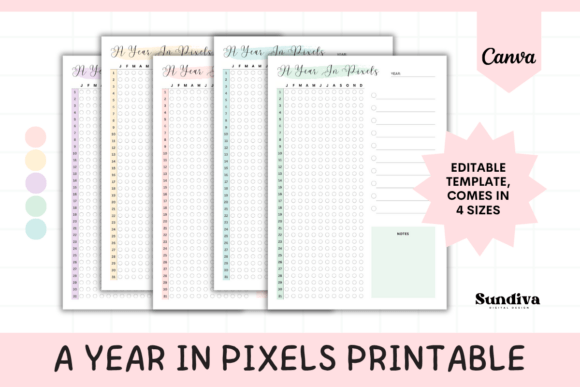
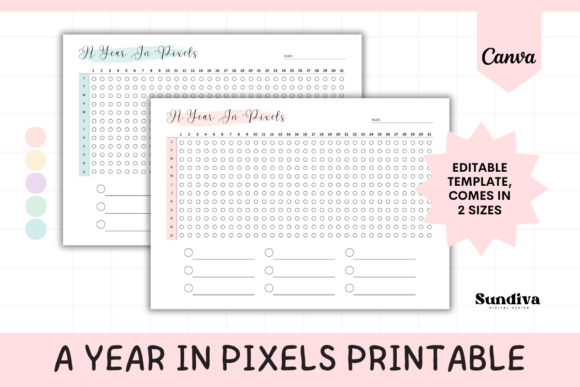
Think of this template as a hybrid between a habit tracker and a mood journal, wrapped in a clean, grid-based layout. The premise is simple yet profound: you have a 31-day grid for all 12 months. Each day, you color in a single "pixel" to represent a feeling, a habit, or a milestone. Over time, these individual pixels connect to form a visual narrative of your year. For designers and visual thinkers, this is a game-changer. It allows you to "see" the texture of your life without getting bogged down in paragraphs of text.
Designing Your Narrative: Visual Style and Appeal
The aesthetic of the Custom a Year in Pixels Canva Template 4 is rooted in modern minimalism. It adopts a landscape orientation, which is a strategic choice for visual flow. This wide format feels expansive, suggesting that there is plenty of room for growth and exploration. The grid system is the backbone of the design, offering a sense of structure and order that appeals to the organized mind, while the blank pixels offer endless creative freedom.
What makes this specific template stand out in the realm of digital assets is its adaptability within Canva. It isn't a rigid, static PDF; it is a dynamic canvas. You are not forced into a specific color palette. Whether your brand identity relies on muted earth tones, vibrant neons, or a strict monochromatic scheme, you can customize the pixels to match. This flexibility ensures that the tool feels like an extension of your personal or professional brand, rather than a generic add-on. It is a premium font equivalent for planning—elevated, intentional, and polished.
From Personal Reflection to Professional Application
While the immediate application seems personal—tracking moods or fitness goals—the utility of the Custom a Year in Pixels Canva Template 4 extends far beyond personal journaling. For entrepreneurs and small business owners, this grid can serve as a high-level business heatmap.
Imagine using the 31-day grid to track daily sales intensity, customer service satisfaction, or team energy levels. By assigning colors to different metrics (e.g., green for high revenue, blue for administrative days, red for crisis management), you create a visual dashboard that reveals patterns invisible in spreadsheets. You might notice that your "red" days cluster around the 15th of every month, prompting you to investigate a specific recurring bottleneck. This is where the template transitions from a creative font style of planning to a hard-nosed business strategy tool.
For content creators and social media managers, the template acts as an editorial calendar. You can color-code your pixels based on content type: video production, blog writing, community engagement, or analytics review. Over three months, you can visually audit your content mix. Are you neglecting video? Is your engagement strategy too sporadic? The grid lays it all bare, helping you maintain a balanced approach to your social media graphics and publishing schedule.
Leveraging the Tool for Brand Consistency
Consistency is the bedrock of strong brand identity. However, maintaining consistency requires awareness. The Custom a Year in Pixels Canva Template 4 provides that awareness through visual feedback loops. When you open your digital planner and see a streak of one color, it reinforces the behavior associated with that color.
This psychological mechanism is powerful for habit formation. If you are trying to establish a new routine—whether it is daily sketching, client outreach, or wellness breaks—filling in that pixel becomes a reward in itself. It gamifies the process of professional development. The landscape layout ensures that you can view multiple months at a glance, allowing you to spot long-term trends. This "bird's-eye view" is crucial for strategic planning, much like how a designer steps back from a canvas to check the composition of a logo design or packaging design.
Practical Integration into Your Workflow
One of the most significant advantages of this tool is its accessibility. It is designed for the Canva ecosystem, meaning you do not need expensive, high-end design software to use it effectively. The requirement is simply a free Canva account. This democratizes the tool, making it accessible to hobbyists and seasoned professionals alike.
When integrating the Custom a Year in Pixels Canva Template 4 into your workflow, consider the following practical tips:
- Define Your Legend Early: Before you start coloring, establish a clear key. For a business, this might be: Green = Profitable Day, Yellow = Break Even, Red = Loss. For personal use: Blue = Calm, Orange = Stressed, Purple = Inspired.
- Use it for Project Management: Instead of tracking days, use the grid to track project phases. Assign a color to "Ideation," "Execution," "Review," and "Launch." This turns your year into a visual project timeline.
- Print vs. Digital: The template comes in US Letter and A4 sizes, making it perfect for printing. However, keeping a digital copy on your desktop or in the Canva app allows for quick updates during a busy workday. Having both options ensures you never miss a day of tracking.
Evaluating the Fit and Customization
Like choosing a sans serif font for a tech startup or a serif font for a luxury magazine, choosing the right planning tool depends on context. The Custom a Year in Pixels Canva Template 4 is ideal for those who think visually. If you are a data analyst who loves spreadsheets, this might feel too abstract. But for the designer, the marketer, the crafter, and the creative entrepreneur, this format speaks your language.
Furthermore, the customization capabilities allow you to maintain your professional aesthetic. You can upload your brand’s hex codes directly into Canva and apply them to the pixels. You can even add your logo to the header of the template if you plan to share your progress with clients or your audience as a transparency report. This level of personalization turns a generic tracker into a bespoke piece of modern typography and design.
Ultimately, the goal of the Custom a Year in Pixels Canva Template 4 is to provide clarity. In a world of noise, having a clean, visual representation of your year helps you cut through the clutter. It is a tool for reflection, a mechanism for accountability, and a piece of art that documents your journey. Whether you use it to track business growth or personal well-being, it offers a simple, effective way to stay mindful and see the progress you are making, one pixel at a time.