Canva Colorful Boxes Sticker Template: Your DIY Sticker Solution
Creating custom stickers for your planner, journal, or small business shouldn't require a design degree or expensive software. The Canva Colorful Boxes Sticker Template offers a straightforward, practical solution for anyone looking to produce vibrant, organized sticker sheets using tools they likely already have. This isn't about complex design theory—it's about giving you a functional, editable framework to bring your sticker ideas to life efficiently.
What This Template Actually Is
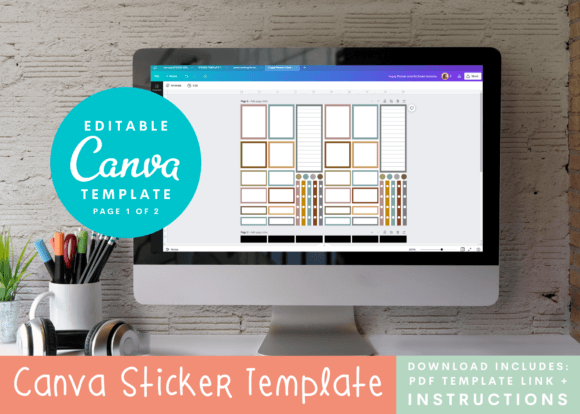
At its core, this is an editable Canva template structured with a grid of colorful boxes, each measuring 1.5 inches wide. It’s designed as a starter canvas. You receive a PDF with clear instructions and a direct link to the Canva template file. The pre-filled boxes are simply examples of how you might use the layout—think category labels, habit trackers, motivational quotes, or decorative accents. The real value lies in its flexibility. You can modify colors, change text, add your own graphics, or completely overhaul the design to match your personal aesthetic or brand identity. It’s a design asset meant to save you time on layout and formatting, letting you focus on the creative part.
Designed for Planners, Journals, and Beyond
While optimized for popular vertical planner systems like the Happy Planner, the utility of this sticker template extends much further. The 1.5-inch box grid is a versatile size for numerous applications. Use it to create:
- Functional planner stickers for appointment setting, to-do lists, and meal planning.
- Decorative elements for scrapbooking and journaling.
- Product labels for small batches of handmade goods.
- Packaging design accents for boutique products.
- Branded stickers for entrepreneurs and content creators to include with orders or at events.
The template acts as a foundational grid, ensuring your stickers are consistently sized and laid out, which is crucial for a professional print & cut process.
From Digital Design to Physical Sticker
The workflow is designed for crafters using a Cricut Explore or Silhouette machine. After customizing your design in Canva, you'll use your machine's software to format it for print & cut. This involves printing your sticker sheet on sticker paper and then loading it into your die-cutting machine, which reads the registration marks and cuts out each individual sticker with precision. The included instructions guide you through this process, but a basic familiarity with your machine's features is necessary. This method allows for intricate, custom shapes that would be incredibly time-consuming to cut by hand, though the templates are also perfectly suitable for manual cutting if you prefer.
Practical Tips for Getting the Most Out of Your Template
To ensure a smooth experience and high-quality results, consider these practical points:
- Canva Proficiency: You don’t need to be an expert, but knowing how to navigate Canva’s interface, edit text, change colors, and upload your own images will make the process much easier. The free Canva account provides all the tools you need.
- Sticker Paper Matters: The final feel and durability of your stickers depend heavily on the paper you use. Matte, glossy, and vinyl options each offer a different look and texture. Test a few to find what works for your project.
- Font Choice & Readability: When adding text to your 1.5-inch boxes, prioritize readability. A sans serif font often works best at small sizes for clean, clear labels. Avoid overly decorative script fonts for functional text, as they can become illegible when cut. This is where thinking like a designer—considering visual hierarchy and typography—pays off, even in a small format.
- Commercial Use: If you plan to sell stickers made with this template, review the licensing terms provided. The template itself is a commercial font and asset toolkit, but you are responsible for ensuring any additional graphics or fonts you incorporate also have the appropriate commercial license.
The Canva Colorful Boxes Sticker Template is less about the boxes themselves and more about providing a structured starting point. It removes the initial hurdle of setting up a print-ready grid, allowing you to dive straight into the creative process of designing stickers that are uniquely yours, whether for personal use, your brand identity, or your small business.