Transform Your Culinary Content: The Canva Recipes CookBook Template
As food bloggers, chefs, and culinary creators, we know that a recipe is more than just a list of ingredients; it's a story told through flavor, aroma, and memory. However, translating that sensory experience into a static format requires a specific kind of design magic. When you are trying to monetize your content or build a loyal audience, a messy recipe card or a cluttered Instagram post simply won't suffice. You need a professional vessel that respects the art of cooking while making the information accessible. This is exactly where the Canva Recipes CookBook Template steps in. It bridges the gap between raw culinary creativity and polished editorial design, providing a structured yet flexible framework for your work.
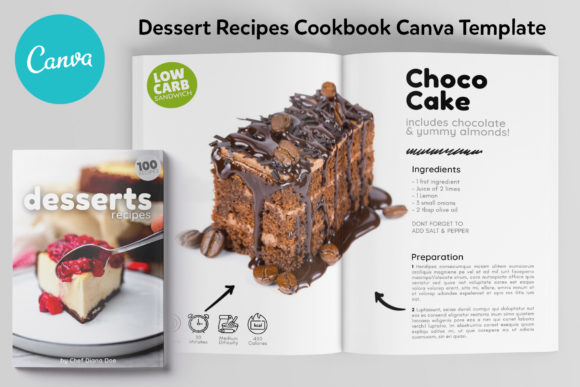
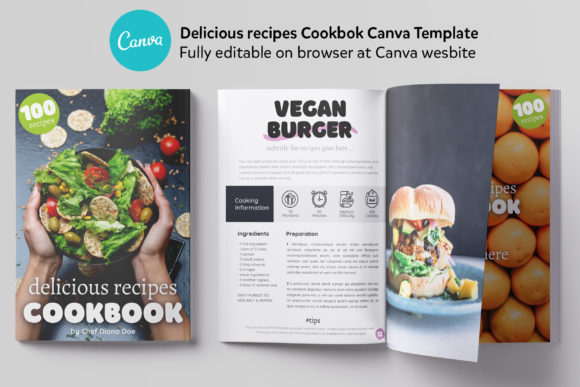
The visual personality of this template is defined by a clean, modern aesthetic that prioritizes readability without sacrificing style. It doesn't scream for attention with loud graphics; instead, it uses white space and thoughtful layout to let your food photography take center stage. The style is versatile enough to fit a rustic, farm-to-table blog or a sleek, modern fine-dining magazine. It is designed specifically for the A4 (210x297 mm) format, which is the industry standard for professional print publications and high-quality digital PDFs. The overall appeal lies in its ability to make amateur content look professional and professional content look exceptional. It creates a sense of authority—crucial for anyone looking to establish themselves as an expert in the food industry.
The Anatomy of a Perfect Recipe Layout
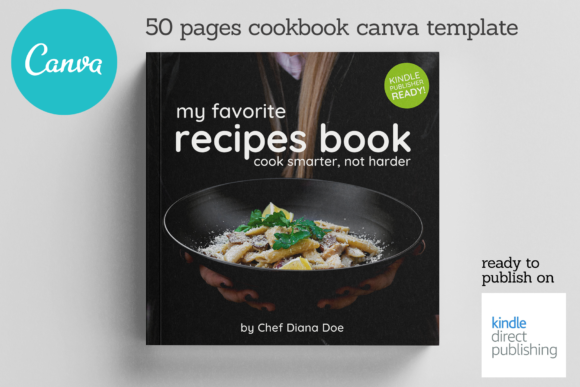
When you open the file, you aren't just getting a blank canvas; you are getting a comprehensive system. The Canva Recipes CookBook Template includes 21 pages of meticulously organized content. You start with a compelling Cover page that sets the tone for your entire book or magazine. Following that is the Editorial page, which is often overlooked by amateurs but essential for establishing the publication's voice. The inclusion of an About the author page is a strategic move for personal branding, allowing you to build a connection with your audience by sharing your culinary journey.
Functionality is key here. The Table of contents page samples allow for easy navigation, a feature that significantly improves the user experience for digital readers flipping through a PDF on their tablets. The heart of the template, however, lies in the 6 unique layouts for recipes. This variety prevents the "sameness" that can make cookbooks feel monotonous. One layout might feature a full-bleed image with a text overlay, perfect for a dramatic dessert shot, while another might offer a two-column text-heavy approach for complex technical instructions. This creative font usage and layout variation keep the reader engaged and allow you to tailor the design to the specific mood of the dish you are presenting.
Strategic Branding and Visual Hierarchy
For the entrepreneur or small business owner, consistency is the currency of trust. Using the Canva Recipes CookBook Template allows you to establish a rigid visual hierarchy. By utilizing the pre-set grids and typography styles, you ensure that every recipe you publish looks like it belongs to the same family. This is vital for brand identity. When your followers see your layout on Instagram or Pinterest, they should recognize it as yours before they even read the title.
The template handles modern typography with a keen eye for balance. While you have the freedom to edit, the default settings offer a masterclass in font pairing. Typically, such templates use a bold display font or serif font for headers to grab attention, paired with a highly legible sans serif font for the body text and ingredient lists. This ensures that the actual cooking instructions are never compromised by style. For those looking to add a personal touch, swapping in a script font or handwritten font for accents can soften the look, making the book feel more homemade and approachable. This flexibility allows you to influence brand perception—whether you want to be seen as scientific and precise or warm and nurturing.
Practical Application: From Screen to Print
One of the greatest strengths of this asset is its adaptability across different media. Because it is a fully editable Canva file, it is not just for print. This template is a powerhouse for digital design. You can easily repurpose the pages as lead magnets for your email list (e.g., "Download my free 5-page Holiday Cookie Guide"), or use the individual recipe layouts as social media graphics for Instagram carousels. The A4 aspect ratio translates well to PDF downloads and blog content.
For those considering packaging design or selling physical goods, the commercial font licensing details included in the NOTES FILE are a lifesaver. Understanding licensing is often the most confusing part of using design assets. This template clarifies what you can and cannot do, ensuring your business stays compliant. The included TXT file with photo-icons links and credits ensures that you can source the exact visual elements used in the preview, or replace them with your own high-resolution images. This transparency is a hallmark of premium font and template providers.
Maximizing Readability and Audience Engagement
Ultimately, a recipe book fails if the user cannot cook from it. The Canva Recipes CookBook Template excels in readability. The layouts are designed with the "glance test" in mind—can a home cook quickly look up from their mixing bowl and find the next step? The text sizing is generous, and the contrast ratios are high. This attention to detail directly influences audience engagement. When users find your content easy to use, they are more likely to try the recipe, share the result, and come back for more.
Moreover, the professional finish of the template lends professionalism to your work. If you are a chef looking to create a portfolio or a food stylist pitching to clients, presenting your work in this format shows that you value quality. It elevates your status from a hobbyist sharing snapshots to a creator publishing valuable content. The recognition you gain from this consistent, high-quality output is invaluable. Whether you are designing for web design or preparing a file for the printer, this template provides the structure you need to succeed. It removes the guesswork from layout design, allowing you to focus on what you do best: the food.